The Hidden Cost of Manual Work: How to Calculate Whether AI Automation Will Actually Pay Off
August 13, 2026
Oleksandr Shubin | Founder & CEO at SDA
How Much Is the Lack of Automation Actually Costing Your Company?
Picture a mid-sized company: say, 80 employees, a CRM, an ERP, a dozen spreadsheets, and a handful of SaaS tools connected by hand. Orders come in. Sales is busy. Operations pulls reports every Friday. Nothing is "on fire."
The CEO isn't worried. Revenue is growing year over year. The team is "keeping up." Nobody has stopped to ask a simple question: what does it actually cost the company to operate this way?
Somewhere in this company, a sales manager is manually re-entering the same customer data from a web form into the CRM, then into the invoicing system, then into a shared spreadsheet for finance. The operations lead spends every Monday manually reconciling warehouse stock because the warehouse system and the ERP aren't integrated. A routine purchase approval sits in someone's inbox for weeks because the approver is traveling.
None of this looks like a "problem." It looks like a normal workday. That's exactly why it's expensive: nobody has ever put a number on it.
That's the core idea of this article: the biggest cost of automation isn't implementing it. It's the accumulated cost of not automating, which a company quietly pays year after year through salaries, delays, and errors that nobody ever added up.
Most companies approach AI and automation backward. They ask, "How much does AI cost?" The question that actually leads to a good investment decision is: "How much is the lack of automation costing us right now?" The rest of this article is built around answering that question with numbers, not hype.
Why Manual Work Costs More Than Most Companies Think
Manual work feels free because it's already baked into existing salaries. Nobody gets a separate invoice labeled "cost of moving data between systems." That invisibility is exactly what makes it dangerous for the budget.
In a typical mid-sized company running a CRM, an ERP, Excel, and various SaaS tools, manual work piles up in places like:
- copying data between systems that aren't integrated (CRM ↔ ERP ↔ spreadsheets);
- double data entry, the same customer, order, or invoice entered two or three times;
- manually building reports by exporting, cleaning, and reformatting data in Excel;
- approvals routed through email chains instead of structured workflows;
- manually checking documents, invoices, or contracts for errors;
- manually updating the CRM after calls or meetings;
- handing off tasks between teams via Slack messages or verbal requests.
An employee's salary is just one line of the real cost. The full cost also includes:
- delays, work sitting in someone's queue instead of moving instantly;
- human errors and the time spent finding and fixing them;
- rework, redoing something that was done wrong the first time;
- lost sales, leads that go cold while waiting on a manual step;
- unhappy customers, slow replies, wrong invoices, missed follow-ups;
- stale analytics, decisions based on last week's data because this week's report isn't ready yet.
None of these items shows up as a separate line in the budget. They all show up as slower growth, thinner margins, and a team that's constantly "busy" but never quite catching up. If any of this sounds familiar, it's worth reading how spreadsheet-based processes quietly stop scaling once a company grows past a certain size.
What Hidden Costs of Manual Work Do Companies Usually Ignore?
How Much Does Lost Employee Time Actually Cost?
A hidden truth about labor cost: an hour of manual, repetitive work costs more than the hourly rate suggests. Three factors inflate the real number:
- Context switching. Every time someone moves from a customer call to data entry and back, they lose focus. Research on task switching consistently shows a measurable "resumption lag": the first few minutes after switching are noticeably less productive than the rest of the time.
- Waiting on information. An employee waiting for a report, an approval, or a colleague's reply isn't paid for waiting, but is effectively paying for it in time.
- Re-entering data. Entering the same information into three systems doesn't just triple the effort. It triples the odds of a mismatch between those systems, which then has to be found and fixed.
A rule of thumb often used by operations teams: if manual, repetitive tasks take at least 90 minutes a day per employee, that's roughly 18-20% of a full salary spent on work with no strategic value, before even counting the side effects below.
What Do Human Errors in Manual Processes Really Cost?
Manual processes are where small errors are born, and they're the most expensive place to catch them late. Common examples:
- a wrong price on an invoice, noticed only after a customer complains;
- a duplicate order because two people updated the same spreadsheet at the same time;
- a copy-paste error in a report that leads to a wrong decision;
- customer data entered differently across systems, breaking marketing segmentation or billing.
The core economic lesson here isn't new, but it's still constantly ignored: catching and fixing an error costs far more than preventing it. A pricing error caught before the invoice is sent takes minutes to fix. The same error caught by an angry customer gets "fixed" with a support ticket, an apology, and sometimes a discount just to keep the relationship.
How Do Stale Reports Slow Down Business Decisions?
When reports are built manually once a week (or once a month), leadership is always making decisions on outdated data. A stock shortage stays invisible until Monday's inventory report. A drop in lead conversion stays invisible until sales notices the pipeline "feels thin," weeks after the actual cause occurred.
The business impact here isn't abstract: budget, hiring, and pricing decisions get made later than they should, and sometimes get made wrong, because the data behind them was already stale by the time it reached the decision maker.
How Much Revenue Does a Company Lose Without Automation?
This is the cost category executives usually underestimate the most, because it never shows up as a line item. It shows up as revenue that simply never appeared:
- a lead fills out a form and waits two days for a follow-up because the request got stuck in an inbox, then goes to a faster competitor;
- a billing support ticket takes four days to resolve, and the customer leaves;
- the sales team spends so much time manually updating the CRM that there's less time left for actual selling;
- a proposal goes out late because it needed three manual approvals, and the deal goes to a vendor who replied faster.
None of these situations will appear on a P&L statement as "loss due to lack of automation." They just show up as slightly lower conversion, slightly higher churn, and a sales team that "should be performing better."
Which Business Processes Should You Automate First?
The right first question isn't "should we use AI?" It's "which process is bleeding the most, and is it actually a good candidate for automation?" Below are the processes that companies with 20-500 employees most often automate first, and why.
| Process | What Gets Automated | Main Business Impact |
|---|---|---|
| Lead management | Automatic capture, scoring, and routing instead of manual triage | Faster follow-up, fewer leads lost to delay |
| CRM updates | Automatic logging of calls, emails, and meeting notes into the CRM | Cleaner data, less admin work, more accurate forecasting |
| Customer support | Ticket triage, answers to common questions, routing to the right agent | Faster response times, more consistent service quality |
| Invoice processing | Data extraction, reconciliation, approval routing | Fewer errors, faster payment cycle |
| Reporting | Automatic dashboards built on live data | Real-time visibility instead of weekly snapshots |
| Inventory management | Automatic stock tracking and reorder triggers | Fewer shortages and overstock situations |
| HR onboarding | Document collection, task assignment, account setup | Faster time to productivity, fewer missed steps |
| Approval workflows | Rule-based structured approvals instead of email chains | Shorter cycle time, clear audit trail |
| Internal requests | IT tickets, purchase requests, access requests | Less manual routing, faster processing |
| Data synchronization | Automatic sync between CRM, ERP, and other systems | Eliminates duplication and data mismatches |
A useful filter for prioritizing: look for processes that are frequent, rule-based, and currently done manually. That combination of three conditions usually means the fastest payback. If you're unsure whether a given process even qualifies as automatable yet, it's worth reading about how manufacturing teams identified 40+ hours a week of automatable work before committing budget to a build.
How Do You Calculate Automation ROI Before Starting a Project?
This is the step most companies skip, and it's the one that actually determines whether an automation project makes sense.
The calculation doesn't need to be complicated. It follows a simple chain:
↓
× Fully loaded hourly cost of the employees involved
↓
= Current annual cost of the manual process
↓
− Estimated cost after automation (remaining manual work + tool cost)
↓
= Estimated annual savings
↓
÷ Implementation cost
↓
= ROI
Sample ROI Calculation, Step by Step
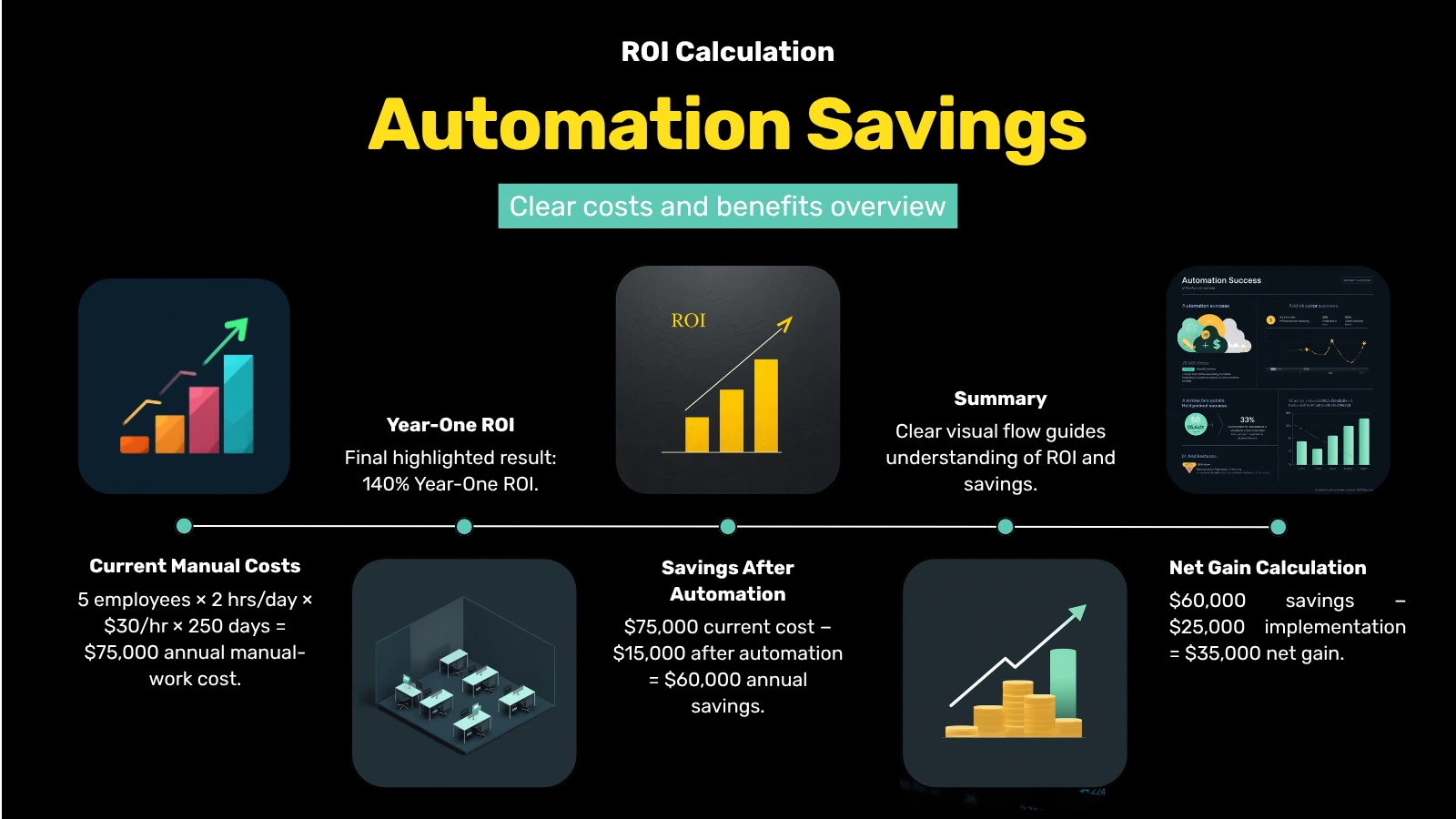
Suppose a company has 5 employees, each spending 2 hours a day on a manual reporting and data entry process, at a fully loaded hourly cost of $30, over 250 working days a year.
That's the current annual cost of the manual process, not a rough guess but ordinary arithmetic that most companies never actually do.
Now suppose an automation project costs $25,000 to implement and cuts the manual portion of the work by roughly 80%, leaving about $15,000/year in remaining manual work and tool costs.
ROI = ($60,000 − $25,000) ÷ $25,000 = 140% in year one
(and $60,000/year in every year after)
Even a rough version of this calculation, with estimated hours and a conservative hourly rate, is far more useful for decision-making than a "let's just implement AI and see" approach. It turns an abstract technology decision into a financial one, and that's a language any CEO or CFO already speaks fluently.
Case Study: How a Mid-Sized Logistics Company Paid Back Automation in 7 Months (Anonymized)
Product type: an internal operations platform connecting order processing, warehouse, and finance workflows for a logistics company.
Stack: an existing on-prem ERP, a cloud CRM, Google Sheets for reporting, custom Node.js and PostgreSQL middleware integrated via REST APIs; automation logic added through a workflow engine and a lightweight AI classification model for document sorting.
Scale: roughly 140 employees, about 3,000 orders per month, a six-person operations team manually reconciling data and building reports.
The problem: the operations team spent about 3 hours a day (combined across four people) manually reconciling warehouse stock against ERP data, plus another 1.5 hours a day building a daily shipment status report by exporting data from three separate systems into a shared spreadsheet. Errors in the manual reconciliation led to an average of 6-8 wrong inventory decisions per month, occasionally causing shortages of fast-selling items.
The solution: the team didn't start by buying AI. It started by measuring: tracking actual hours spent, counting error frequency, and estimating the revenue impact of shortages over the previous two quarters. That produced a documented current annual cost of about $95,000 (labor plus estimated lost sales from shortages). Based on that number, the team built a phased automation plan: first, a data sync layer that eliminated double entry between the warehouse system and the ERP; next, an automated daily reporting dashboard; then, a lightweight classification model that flags inventory movement anomalies for human review rather than replacing the human decision entirely.
The result: implementation cost was about $32,000. In the first year, time spent on manual reconciliation dropped by roughly 70%, freeing up capacity equal to nearly two full-time roles for higher-value operations work. Reporting that used to take 1.5 hours a day became nearly instant. Inventory shortage incidents dropped by more than half within two quarters of launch. Against the $95,000 baseline, the project paid for itself in about seven months.
The lesson from this project isn't that "automation works." The lesson is that the ROI case only became obvious because the team measured the cost of manual work first. Without that baseline number, a $32,000 implementation cost would have looked like a leap into the unknown rather than a financial decision with a documented seven-month payback.
What Mistakes Do Companies Most Often Make When Investing in AI?
Why Shouldn't You Buy an AI Tool Before Understanding the Process?
Choosing a tool before the company has mapped out the real workflow in detail is one of the most common and most expensive mistakes. A tool chosen without a clear process map often ends up automating the wrong step, or a step that wasn't actually the bottleneck.
What Happens If You Automate a Broken Process?
Automation speeds up whatever process you feed it, including a bad one. If approvals are slow because nobody agreed on who's supposed to approve what, automating the email chain just produces faster chaos. Fix the process logic first, then automate.
Why Does Data Quality Determine Automation Success?
An automation or AI system is only as reliable as the data feeding it. Duplicate customer records, inconsistent formatting, and missing fields don't disappear when you add AI; they get automated too, at scale, and often become harder to notice.
Why Shouldn't You Judge Automation Success by Cost Savings Alone?
Cost savings is the easiest number to point to, but it's not the whole picture. A complete evaluation should also account for:
- speed, how much faster the process runs from start to finish;
- accuracy, whether the error rate actually dropped and by how much;
- scalability, whether the process can now handle two or three times the volume without additional hiring;
- customer experience, whether response times, order accuracy, and satisfaction scores are improving.
A project that only cuts costs while slowing down delivery or introducing new errors isn't actually a win. It's just a cost moved somewhere less visible. This is a mistake we routinely see at SDA when a company inherits a rushed automation project, sometimes the fix looks less like new automation and more like paying down the technical debt the first attempt left behind.
What Actually Changes After Automation: Manual vs. Automated
| Metric | Typical Manual Process | Typical State After Automation |
|---|---|---|
| Data entry per record | 3-5 minutes, done 1-3 times across different systems | Seconds, entered once, synced automatically |
| Time to build a report | Hours to days, manual | Minutes, near real-time updates |
| Error rate on repetitive tasks | Varies, but consistently nonzero and often underestimated | Significantly lower (exact figures depend on the specific process) |
| Approval cycle time | Days, dependent on one person's availability | Hours, rule-based, less dependent on any single person |
| Visibility into current state | Periodic snapshots (weekly/monthly) | Continuous, dashboard-based |
| Scalability | Requires proportional headcount growth | Can absorb more volume at moderate added cost |
These are general trends rather than universal guarantees. The real numbers for any given company depend entirely on its own process, volume, and data quality, which is exactly why measuring your own baseline matters more than industry averages.
How Do You Know If Your Company Is Ready for AI?
Even after understanding the cost of manual work, most companies still hit the same wall: they don't know where to start. Common sources of uncertainty:
- which processes to automate first;
- where the actual biggest ROI is;
- whether the company is technically ready (data quality, system access, integration complexity);
- which systems need to be connected and how;
- whether there's enough clean, structured data to support automation or AI models.
Trying to answer all of this with internal guesswork usually ends in one of two outcomes: an automation project aimed at the wrong process, or months of internal debate before anything actually gets built. That's why the first practical step isn't picking a vendor, it's measuring readiness based on your own numbers, processes, and systems.
How Can You Get a Free Assessment of Your Automation Readiness?
If you don't know which processes to automate first, aren't sure whether AI would actually pay off in your business, or want a real number instead of a guess, that uncertainty is normal, and it's exactly what this whole article has been pointing toward.
Before allocating budget to any automation or AI vendor, it's worth spending a few minutes on a free Automation Opportunity Assessment. It's designed to give you:
- an AI Readiness Score for your organization;
- the processes with the highest automation potential;
- an estimated time and cost savings;
- a preliminary ROI estimate;
- concrete next steps based on your answers.
It won't tell you to buy anything. It will tell you how much manual work is actually costing you, and that, as this whole article has argued, is the number worth starting from.
Conclusion
Automation makes sense only when it solves a specific, measurable business problem, not because AI happens to be the most talked-about technology in every boardroom right now. Companies that get real value from automation are the ones that start by analyzing processes and calculating ROI, not the ones that start with a product demo.
The math here isn't complicated. Annual hours multiplied by hourly cost gives you the price of continuing to work manually. Compare that to the cost of automating, and the decision usually becomes clear: sometimes in favor of automating, sometimes in favor of fixing the process first, and sometimes in favor of waiting until the data is ready.
All three are legitimate outcomes of this calculation. The only illegitimate outcome is skipping the calculation altogether.
FAQ
How do you calculate automation ROI if you don't have precise time data?
Start with a reasonable estimate: ask the team how much time they spend on the process each week and use a conservative figure. Even an approximate number, applied consistently, gives a far better basis for a decision than skipping the calculation entirely.
Does automation only make sense for large companies?
No. Companies with 20-500 employees are often the best candidates, because manual work at that scale is already financially significant, but the company typically hasn't yet built its own tools to manage it.
What is a realistic payback period for an automation project?
It depends on the process and the company, but many well-defined, frequent processes pay back in 6-12 months. Lower-frequency or higher-complexity implementations can take longer.
Should you automate everything at once?
No. Prioritizing one or two frequent, rule-based processes is usually more effective than rolling out automation across the entire company at once, both financially and in terms of managing change with the team.
Do you need AI specifically, or is workflow automation enough?
Not every process needs AI. Many high-impact automations are purely rule-based, with no machine learning involved. AI becomes relevant for tasks requiring judgment, classification, or unstructured data, such as document sorting or anomaly detection.
What if our data isn't clean enough for automation or AI?
Data quality issues are common and don't automatically disqualify a company from automation, but they need to be accounted for in the plan, sometimes as a first phase rather than something discovered halfway through the project.
How is an "Automation Opportunity Assessment" different from hiring a consultant?
An assessment is usually faster and more structured: it's designed to quickly identify an AI Readiness Score, the best automation candidates, and an estimated ROI, giving the company a data-based starting point before a larger, more detailed engagement.